


Background
My home phone number seems to recently have landed onto a scammers call list, and over the past few weeks I’ve had twelve phone calls (two of which I’ve actually answered) from automated dialers playing the following recorded message:
Now, being technology savvy, I know that it’s highly unlikely that anyone would just cold call me out of the kindness of their heart to tell me I have broadband issues, especially when I’m not even a BT Broadband customer, but many people, especially elderly or more vulnerable people could easily fall for this, so I decided to “play along” and see what unfolded and document the scam so hopefully I can raise some awareness of this scam so others don’t fall into the same trap.
The convincer
So any good scam needs to convince the victim that what they are telling you is accurate, and to make you trust them. The convincer here is a fake automated scan of your home network. So, after pressing “1” after the recorded messages, you’re connected to a real operator (I’m guessing somewhere in India based on the line quality and accent) who then explains that they have detected problems on your internet connection, and start asking about what devices you use to connect to the internet at home.
There are several variations of how the caller “convinces” you that you do indeed have errors on your home network (some involve showing you the Windows event logs if you have a Windows PC)
I decided to go down the Android phone route, pretending I didn’t have any PCs or Macs on my network. The caller got me to download the “Teamviewer QuickSupport” app from the Google Play store, and I gave them the access code so they could connect to the app remotely.
I chose an old Android phone for this particular “honey pot” which didn’t have any personal files or data on, just in case the scammer scraped some data in the background.
After they connected, the first step of the “convincer” is that they called themselves “BT SECURED SERVER” to make you think that somehow this is all secure and safe. Note that Android warms you that your screen is being captured, so the scammer can see everything that you’re doing on your phone, if you type any account numbers or passwords etc.
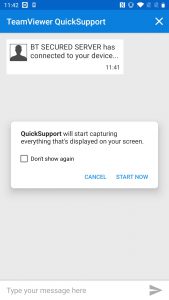
The caller then told me they need to scan my network to try and find the source of this “interference” but they could not start the scan without my permission (luring you into a false sense of security that you’re somehow “in control” here) so I had to type “start scan” to initiate the scanning process.
I duly complied, and of course I’m really just chatting with the scammer via TeamView chat functionality, but someone less aware might slowly start to think this was a genuine troubleshooting tool.
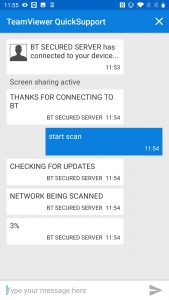
The caller then performs a fictitious “progress counter” from 3% to 100%, asking for regular progress reports pretending they can’t see what the scan is doing (again, this makes you think they aren’t really accessing your device or network, when in reality they are generating the text themselves whilst watching your screen!)
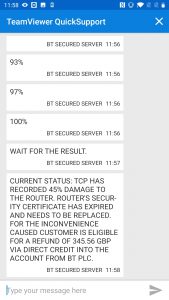
After an awkward few minutes of me trying to keep up the act of an innocent technophobe, my “scan progress” finally reached 100% and I was presented with the “results of the scan” which, to anyone working in IT, almost made me laugh out loud as it was a complete hash of technological terms put together in seemingly random order:
Current status: TCP has recorded 45% damage to the router. Router’s security certificate has expired and needs to be replaced. For the inconvenience caused customer is eligible for a refund of 345.56 GBP via Direct credit into the account from BT PLC.
After resisting the urge to ask the caller how an internet protocol could possibly cause any damage to my router, and why my broadband was working so well given it was “45% damaged”, I put on my best “shocked but surprised” voice at the amount I was to be refunded. The caller then said that an engineer would need to visit to replace my router, and proceeded to make a fictitious booking at a day and time convenient to me. They even gave the name of the engineer (sorry John Martin if you’re actually a real BT Engineer!) and even told me to check his ID before letting him in the house (oh the irony…)
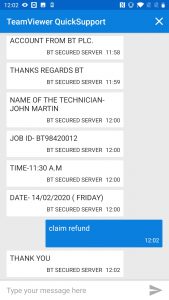
Now, up to this point the caller had probably been on the line at least 30 minutes, so they had certainly taken their time to convince me that there was indeed a fault with my router, someone was coming to fix it, and I was indeed owed this money as compensation, so now it was time to reel in the fish and claim the prize they wanted all along..my credit card details.
I had to type “claim refund” into Teamviewer to initiate the “secure data collection” process so I could enter my details for their fictitious refund. The caller then sent me a link to an internet site, with a form that resembled a payment terminal.
The caller asked me if there was a padlock displayed by the browser so that I knew my details would be “kept secret and secure” and of course given the page had a valid SSL certificate, there was indeed a padlock displayed.
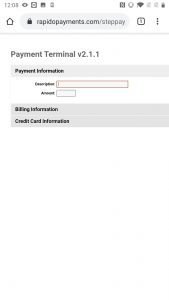
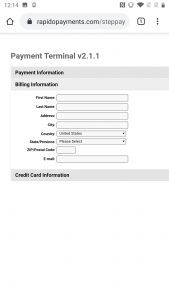
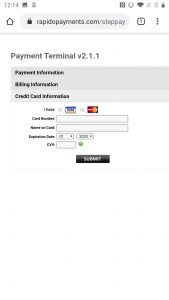
Of course I didn’t enter any real information into the fake payment site, having questioned the caller as to why they needed credit card details when I pay BT vi Direct Debit so they could just refund my account, and after getting lots of flustered excuses about needing to verify my details for security, I hung up.
Hopefully the information here will help at least one person to avoid falling for this kind of scam in the future. Stay safe out there folks!
I’ve published this Ultimate Synergy Survival guide now for seven years running and it’s always popular with both regulars and newbies. Now updated with 2019 links, content and Atlanta-specific information. It’s a living document, so will be subject to updates as we get nearer the conference.
read more…I’ve published this Ultimate Synergy Survival guide now for three years running and it’s always popular with both regulars and newbies. Now updated with 2016 links, content and Vegas-specific information. It’s a living document, so will be subject to updates as we get nearer the conference.
Hope you find it useful!
I’ve published this Ultimate Synergy Survival guide now for six years running and it’s always popular with both regulars and newbies. Now updated with 2018 links, content and Anaheim-specific information. It’s a living document, so will be subject to updates as we get nearer the conference.
Hope you find it useful (and if you end up registering, please use my email address in the “referred by” field on your registration form) – see the end of this post for details

If you’ve seen my Ultimate Synergy guide, or Synergy on a budget posts, you’ll know I’m a Citrix Synergy regular (and iForum before it became Synergy) so I though I’d share my planned agenda with you in advance. I’ll probably refer back to this myself to ensure I’m not missing a key session that I had planned to attend!
The annual Citrix Conference, Synergy, is rapidly approaching and people are starting to make their travel plans.
If you’re like me, an independent consultant responsible for his own travel expenses, or even an employer looking to minimise your staffs travel costs, this post is for you! I also have details of a discount hotel booking specially negotiated for Synergy delegates!
